
Ship-First Debugging: How to Fix Production Bugs Without Killing Your Momentum
The solopreneur's guide to triaging, hot-patching, and maintaining deployment velocity when bugs hit production
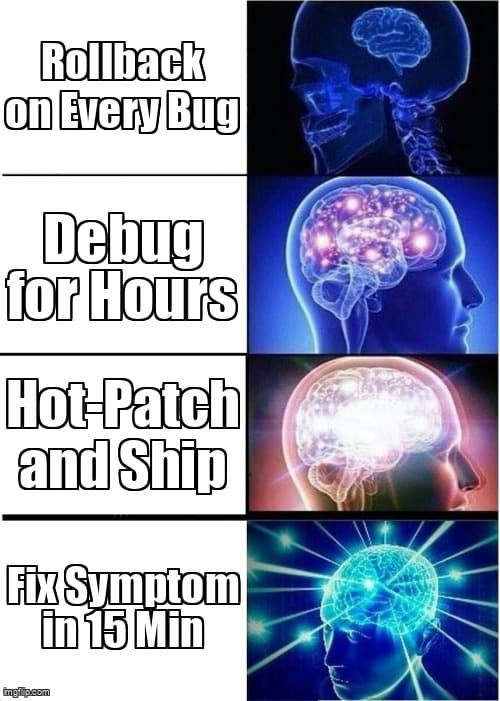
You just deployed your latest feature. Users are loving it. Then Slack lights up: "Payment button broken on mobile." Your heart sinks. Do you stop everything and debug? Rollback? Keep shipping?
As a solo developer, production bugs are momentum killers. But they don't have to be. Ship-first debugging is about maintaining velocity while keeping users happy. No ops team. No incident commander. Just you, your deployment pipeline, and smart decisions.
The 5-Minute Triage System
When a bug hits production, you have one job: assess severity fast. Here's the framework that keeps solo devs sane:
- P0 (Drop Everything): Users can't sign up, checkout, or access core functionality. Revenue is bleeding. Fix now, debug later.
- P1 (Fix This Hour): Feature broken but workarounds exist. Some users affected. Hot-patch within 60 minutes.
- P2 (Fix Today): Minor UX issue or edge case. Document, queue, ship with next deploy.
- P3 (Backlog It): Cosmetic or hypothetical. Let it ride unless user complaints spike.
The key insight: most bugs aren't P0. Solo devs over-triage because we feel every user's pain personally. Build the muscle to distinguish "broken" from "imperfect."
Hot-Patch Patterns That Preserve Flow
Traditional debugging kills momentum because it requires context-switching into detective mode. Hot-patching is different: you fix the symptom first, then investigate the root cause later.
Pattern 1: The Feature Flag Escape Hatch
New feature causing issues? Gate it immediately while you debug. This buys time without rolling back everything.
// Before (breaking production)
export function PaymentButton() {
  return (
    <button onClick={processPaymentWithNewProvider}>
      Complete Purchase
    </button>
  );
}

// After (instant fix)
export function PaymentButton() {
  const useNewPayments = process.env.NEXT_PUBLIC_NEW_PAYMENTS === 'true';

  return (
    <button onClick={
      useNewPayments
        ? processPaymentWithNewProvider
        : processPaymentWithOldProvider
    }>
      Complete Purchase
    </button>
  );
}

// Deploy in 2 minutes, debug the new provider later
Pattern 2: The Try-Catch Safety Net
When something's throwing errors but you don't know why, wrap it and log. Users get a degraded but functional experience. You get diagnostic data.
// Instead of letting it crash
export async function generateAIContent(prompt: string) {
  try {
    return await openai.createCompletion(prompt);
  } catch (error) {
    // Log to your monitoring tool
    console.error('AI generation failed:', {
      prompt,
      error: error.message,
      stack: error.stack,
      timestamp: new Date().toISOString()
    });

    // Fallback: return cached or template content
    return getFallbackContent(prompt);
  }
}
Pattern 3: The Conditional Render Workaround
Component breaking on mobile? Hide it for mobile users while you debug. Ship the partial fix now, polish later.
// Quick mobile fix
export function FancyAnimatedChart({ data }) {
  const isMobile = useMediaQuery('(max-width: 768px)');

  if (isMobile) {
    // Show simple table instead of broken chart
    return <SimpleDataTable data={data} />;
  }

  return <ComplexD3Visualization data={data} />;
}

// Users on mobile get a working experience
// You debug the visualization on desktop later
Rollback vs. Roll-Forward: The Solo Dev's Dilemma
Here's the truth: rolling back feels safe, but it's usually the wrong move for solo devs. Why?
- Rollbacks lose good code. That bug fix? Gone. That performance improvement? Reverted.
- Rollbacks reset your mental context. You were building Feature B. Now you're back in Feature A's code.
- Rollbacks don't prevent the next bug. You'll redeploy the same code tomorrow and hit the same issue.
Roll-forward instead: deploy a quick fix on top of the current code. Here's when each strategy makes sense:
| Scenario | Action | Why |
|---|---|---|
| Database migration failed | Rollback | Data integrity at risk |
| Auth broken completely | Rollback | No workaround exists |
| Payment button styling off | Roll-forward | CSS fix takes 30 seconds |
| New API endpoint errors | Roll-forward | Old endpoints still work |
| Performance regression | Roll-forward | Add caching or optimize query |
Rule of thumb: if you can fix it in under 15 minutes, roll-forward. If it requires investigation, rollback only if users are completely blocked.
Logging Strategies That Catch Bugs Before Users Do
The best debugging session is the one that never happens. Strategic logging turns "user reports bug" into "monitoring alerts you first."
The Three Logs That Matter
- Critical Path Logging: Every user action that touches money, data, or auth gets logged. No exceptions.
- Error Boundary Logging: React error boundaries should send telemetry, not just render fallback UI.
- Performance Threshold Logging: API calls over 2 seconds? Log them. They're tomorrow's outage.
// Minimal production logging setup
import { logEvent } from '@/lib/analytics';

// 1. Critical path: user actions
export async function handleCheckout(cart: Cart) {
  const startTime = Date.now();

  try {
    logEvent('checkout_started', {
      userId: cart.userId,
      itemCount: cart.items.length,
      total: cart.total
    });

    const result = await processPayment(cart);

    logEvent('checkout_completed', {
      userId: cart.userId,
      duration: Date.now() - startTime,
      orderId: result.orderId
    });

    return result;
  } catch (error) {
    logEvent('checkout_failed', {
      userId: cart.userId,
      duration: Date.now() - startTime,
      error: error.message,
      stack: error.stack
    });
    throw error;
  }
}

// 2. Error boundaries: React crashes
export class ErrorBoundary extends React.Component {
  componentDidCatch(error: Error, errorInfo: ErrorInfo) {
    logEvent('react_error', {
      error: error.message,
      stack: error.stack,
      componentStack: errorInfo.componentStack,
      url: window.location.href,
      userAgent: navigator.userAgent
    });
  }
}

// 3. Performance thresholds: slow APIs
export async function fetchWithLogging(url: string) {
  const startTime = Date.now();
  const response = await fetch(url);
  const duration = Date.now() - startTime;

  if (duration > 2000) {
    logEvent('slow_api_call', {
      url,
      duration,
      status: response.status
    });
  }

  return response;
}
Free Tools That Actually Work
Solo devs don't need DataDog. These tools handle 90% of production debugging:
- Sentry (free tier): Error tracking with stack traces and user context. Catches frontend crashes before users email you.
- Vercel Analytics: If you're on Vercel, you already have performance metrics. Check Web Vitals for regressions.
- Logtail or Better Stack: Centralized logging without breaking the bank. Search logs when Sentry doesn't have enough context.
- Your database's slow query log: Most production bugs are accidental N+1 queries. Turn on slow query logging.
The Momentum-Preserving Debug Workflow
Here's the actual workflow that keeps solo devs shipping while handling production bugs:
Triage in 5 minutes
Is it P0? If no, queue it. If yes, continue.
Apply hot-patch
Feature flag it, try-catch it, or conditional-render it. Ship in 15 minutes.
Verify fix in production
Test the patched flow. Check logs. Confirm users aren't blocked.
Return to your original task
You just saved your momentum. The proper fix can wait until your next focused debugging session.
Schedule root cause analysis
Block 1 hour this week to investigate properly. Fix the underlying issue, write a test, remove the hot-patch.
Notice what's not in this workflow: hours of debugging, git bisect sessions, or deep dives into third-party library source code. Those happen later, when you're not under pressure.
When to Stop Patching and Start Refactoring
Hot-patches are tactical wins. But if you're patching the same area repeatedly, that's a signal: this code needs refactoring.
Track your bug patterns. If you've added three feature flags to the same component in a month, that component has design problems. If you're wrapping the same API call in try-catch blocks across multiple files, you need a centralized error handler.
The ship-first mindset isn't about accruing technical debt forever. It's about choosing when to pay it down strategically, not reactively.
Ship-First Debugging in Practice
Real example from a solo dev building a SaaS product: new onboarding flow launched. Within 10 minutes, error tracking showed signup failures on Safari iOS.
Old approach: Drop everything, fire up BrowserStack, spend 2 hours debugging Safari-specific issues, lose entire afternoon's momentum.
Ship-first approach: Add device detection, show Safari users the old onboarding flow, deploy in 5 minutes. Investigate Safari bug later that week during scheduled debugging time.
Result: 95% of users got the new experience immediately. 5% of users (Safari iOS) got the working old experience. Developer shipped two more features that afternoon instead of context-switching into debug mode.
The Mindset Shift
Traditional debugging culture treats bugs as moral failures requiring immediate penance. Ship-first debugging treats bugs as expected side effects of velocity.
You're not a bad developer because you shipped a bug. You're a pragmatic one because you shipped a fix in 15 minutes instead of blocking users for 3 hours.
This mindset unlocks something powerful: the ability to ship fast without fear. Because you know when things break, you have a system to patch quickly and debug properly later.
Your Action Plan
Start building your ship-first debugging muscle this week:
- Set up error tracking (Sentry free tier takes 10 minutes)
- Add critical path logging to your payment/auth flows
- Create a feature flag system (even just environment variables)
- Document your triage process (P0/P1/P2/P3 definitions)
- Schedule weekly "bug root cause" sessions instead of debugging reactively
Next time production breaks, you'll have a playbook. Patch fast. Ship forward. Debug later. Keep your momentum.
That's the vibe.
Ready to deploy with confidence?
Desplega helps teams in Barcelona, Madrid, Valencia, Spain and across Europe ship faster with automated testing and deployment pipelines. Catch bugs before production and maintain your momentum.
Contact UsRelated Posts
Why Your QA Team Is Secretly Running Your Company (And Your Developers Don't Want You to Know) | desplega.ai
A satirical exposé on how QA engineers have become the unsung kingmakers in software organizations. While CTOs obsess over microservices, QA holds the keys to releases, customer satisfaction, and your weekend.
Rabbit Hole: Why Your QA Team Is Building Technical Debt (And Your Developers Know It) | desplega.ai
Hiring more QA engineers without automation strategy compounds technical debt. Learn why executive decisions about test infrastructure matter 10x more than headcount.
Rabbit Hole: TDD in AI Coding Era: Tests as Requirements
TDD transforms into strategic requirement specification for AI code generation. Tests become executable contracts that reduce defects 53% while accelerating delivery.